I’ve been using ToDoIst for 5+ years now to manage the many tasks I have for clients and big projects. They recently emailed a tool to help you decide which productivity method is the right one for you to use. It has to be something that you really will use over a long period of time.
I use a mix of electronic and printed. I put the tasks in ToDoIst so they don’t get lost then print them each day so I can get that endorphin rush when I check off a task. I print a list before a client meeting to be sure I talk about all the projects we’re working on.
 Testimonials have always been an important part of marketing. Today, in our digital world, online reviews are critical. Many prospects check for reviews on Google or Facebook before they even visit a company’s website.
 How does your prospect or client KNOW that you are the expert they’re looking for?
 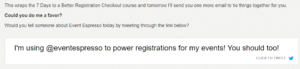 Don’t ask for client reviews once. Ask many times in many different ways! You can’t tell when a client will have the time and the focus to do a review. So ask often and make it easy! Here is a good example. Event Espresso is a plug-in for WordPress to organize events and ticket sales. They did a 7 day series of email lessons. At the bottom of #7, they inserted a link to their Twitter profile. They asked for a tweet. This is an easy type of review request. I didn’t have to think of what to write, look up their Twitter ID. Nothing like that! Click on the link and share the word.
 “Email and texting each have their ideal uses in a business context, depending on the nature of the communication, the audience, and the level of formality required.”