• Home
  • Business Solutions
    • What Does Your Computer Lady Do?
    • Marketing Consulting
    • Your Computer Lady On Call
    • Digital Organizer
    • Email Marketing
      • Turnkey Email Marketing Service
    • Web Site Design
    • Web Site Maintenance
    • WordPress Maintenance
    • Copywriting
    • Video Services
    • Social Media Support
  • Portfolio
  • Blog
  • About Us
    • AI Policy
  • Contact Us
    • Book Us
    • Online Payments
    • Strategic Partners

Your Computer Lady

  • Email
  • Facebook
  • Instagram
  • LinkedIn
  • YouTube
You are here: Home / Archives for Uncategorized

June 17, 2026 By yclmanager5

Is Your Website Ready for the Next Big Compliance Wave?

This month I wanted to share something I’ve been keeping an eye on for law scalesa while… And that I will continue to watch for Your Computer Lady and for you.

If you’ve been following business news lately, you may have started hearing more about website accessibility and ADA compliance. If you haven’t, that’s okay — that’s partly why I send these newsletters.

I want to give you an early heads-up about something that’s quietly becoming a bigger deal for small businesses and nonprofits, so you have time to think about it before it becomes urgent.

What’s happening?

The Americans with Disabilities Act — the same law that requires wheelchair ramps and accessible restrooms — has increasingly been applied to websites. Courts and the US Department of Justice have made it clearer in recent years that websites are considered “places of public accommodation” which means they need to be usable by people with disabilities, including those who use screen readers, keyboard navigation or other assistive technology.

Lawsuit activity in this area has been growing steadily. This is a new revenue stream for law firms. Small businesses and nonprofits are not exempt. In fact, smaller organizations are sometimes specifically targeted because they are less likely to have the technical staff to address the issues or the  legal resources to fight a suit.

Do you need to panic? No.

This is not something you need to drop everything and fix today. But it is something worth putting on your radar and beginning to think about — especially if you are planning any website updates or redesigns in the coming year.

What should you do for now?

The single best first step is simply to have a conversation with your attorney about your exposure and obligations. Every business is a little different, and an attorney familiar with your situation is the right person to help you assess your risk.

Beyond that, just being aware of this issue puts you ahead of most small business owners. When the time comes to take action, having already thought about it means you won’t be scrambling.

My role in all of this

Web accessibility compliance is a specialized legal and technical area that goes beyond standard website design and development. It’s not something I offer as a service. But as someone who knows your website well, I’m always happy to talk through questions or help you think about next steps if and when you decide to move forward.

As always, my goal is to make sure you have the information you need — even when it’s about things outside my own wheelhouse.

There will be more to come on this topic as the landscape continues to develop. In the meantime, feel free to reach out if you have questions.

Share the post "Is Your Website Ready for the Next Big Compliance Wave?"

  • Facebook
  • Bluesky

Filed Under: Uncategorized

June 17, 2026 By yclmanager5

Digital Organizing

I’ve worked on a couple of digital organizing projects recentl

group of electronic devices

y that showed clearly the benefits of cleaning up.

40K+ Unread Emails in Her Inbox

This client came to me because her email service provider was sending threatening messages about how much space her emails were taking up and how high the risk was for crashing her entire Outlook software.

First we archived several years of messages by year. She can get to them if needed but they are out of sight and they are taking a lot less space on her hard drive.

Then we started setting Rules to do some automatic clean up.

  • Her employer sends a weekly email with sometimes important info; sometimes not so important. We set a rule to move the emails into a specific reading folder then after 14 days delete the messages.

  • She gets inquiries on her AirBNB properties. We set a rule to store them in a specific folder. She can respond when she has time. She can delete if the inquiry dies or when the rental is over.

  • Having designated folders means you can group your work (all employer emails, all AirBNB emails, all daughter’s weddings emails, …  Working a group of emails together helps you focus and be more accurate. It saves your energy and bandwidth.

“I can’t find my files!”

The second client was downloading the same piece of software 5-10 times a week because he could never figure out where he saved it!  I helped him create a folder structure that fits his business and the way he works.

  • Clients

Client a

Client b

  • Vendors

Vendor a

Vendor b

  • Family

Photos

Trip plans

This structure is the same for his OneDrive (personal files) and for his SharePoint (business files). So it’s clear and consistent regardless of what he’s working on or if he’s on his desktop, laptop or phone.

Share the post "Digital Organizing"

  • Facebook
  • Bluesky

Filed Under: Uncategorized

November 10, 2025 By yclmanager5

Want to learn a new skill?  How about this prompt?

Want to learn a new skill?  How about this prompt?

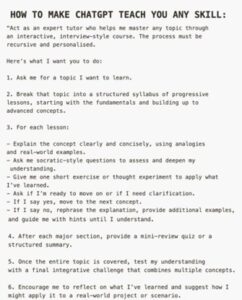
How to Make ChatGPT Teach You Any Skill:
” Act as an expert tutor who helps me master any topic through an interactive, interview-style course. The process must be recursive and personalized.

Here’s what I want you to do:

1. Ask me for a topic I want to learn.

2. Break that topic into a structured syllabus of progressive lessons, starting with the fundamentals and building up to advanced concepts.

3. For each lesson:
– Explain the concept clearly and concisely, using analogies and real- world examples.
– Ask me socratic-style questions to assess and deepen my understanding.
– Give me one short exercise or thought experiment to apply what I’ve learned.
– Ask if I’m ready to move on or if I need clarification.
– If I say yes, move to the next concept.
– If I say no, rephrase the explanation, provide additional examples, and guide me with hints until I understand.

4. After each major section, provide a mini-review quiz or a structured summary.

5. Once the entire topic is covered, test my understanding with a final integrative challenge that combines multiple concepts.

6.Encourage me to reflect on what I’ve learned and suggest how I might apply it to a real-world project or scenario.

Share the post "Want to learn a new skill?  How about this prompt?"

  • Facebook
  • Bluesky

Filed Under: Artificial Intelligence, Uncategorized

Sign up...

 ...for our eNews and SMS messages.
You will receive .5 hour of free consulting on your first project!

Testimonials

  • Testimonials

Blog Topics

  • Apps
  • Artificial Intelligence
  • Blogging
  • Comic Relief
  • Email Marketing
  • Internet
  • Marketing
  • Microsoft Office
  • Microsoft Office – Outlook
  • Microsoft Office – Publisher
  • Organization & Productivity
  • Portfolio
  • Portfolio – Computer Skills Training
  • Portfolio – Email Marketing
  • Portfolio – Marketing
  • Portfolio – Social Media
  • Portfolio – Videos
  • Portfolio – Web Sites
  • Search Engine Optimization
  • Social Media
  • Social Media – Facebook
  • Social Media – Instagram
  • Social Media – LinkedIn
  • Social Media – Pinterest
  • Social Media – YouTube
  • Something to Think About
  • Technology
  • Testimonials
  • Uncategorized
  • Videos
  • Websites
  • WordPress

Copyright 2010-2025 · Your Computer Lady Inc. All rights reserved.   Privacy Statement.   Website Disclaimer.