 “Instagram’s rolling out some new sharing features, along with a new campaign to highlight creativity in the app, which will be headlined by a range of popular musicians.”
All That Tech Stuff!
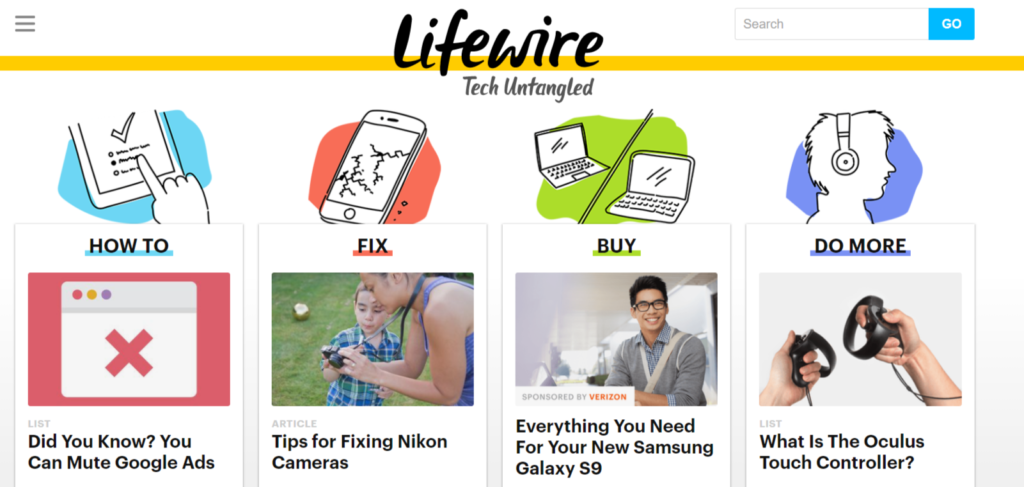
Here is a cool site with lots of answers and lots of suggestions for you on all things tech – phones, online banking, Alexa, speakers, etc. The content ranges from simple “What is a platform?” to more complex “How to buy the right laptop.”
And it’s FREE!
What is Duplicate Content? Does It Harm Your Site?
 A great way to beef up your website content and educate your visitors is to share websites and articles from other sources. Industry sites. Industry magazines. Expert articles.
Your best method is to write a short intro using your keywords and showing your expertise on the topic THEN link to the article.
There is a proper way to it and this article walks you through the pros and cons.
How Data Turns Into Marketing
Look at this excellent email from Southwest Airlines. They’ve used data they have in their system already to encourage you to travel more.
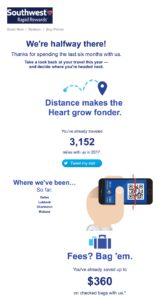
We’re halfway there!
There goes my competitive nature! I want to BE there!
3,152
Tell me what I’ve done.
Where we’ve been…
Not where have YOU been. Where have WE been. Now we’re a team.
Fees? Bag ’em.
One more positive point to make me feel good about flying Southwest.
Where to next?
The soft close!
Book now
The real close.
What data could you use to build a relationship with your clients?
Number of widgets purchased this year compared to last year.
Percentage of increase in business together this year.
Number of projects completed together.
Number of years working together.
Send at least a thank you card! How surprised will they be to get a nice piece of mail?? Or put together a graphic like this one that can be used with multiple clients. Do a Facebook video of you and your team shouting thank you.
People will respond to your thoughtfulness and your unusual approach.
LinkedIn Moves to #2 For B2B Marketing

Here is the overall distribution for all survey participants.
In the Social Media Examiner “2025 Social Media Marketing Industry Report” I was pleased to see that LinkedIn moved ahead of Instagram as the most popular platform marketing. I have been a fan of LinkedIn for years so I’m pleased to see more marketers recognizing its potential.
Facebook continued its decline. They dropped from 44% to 37%. LinkedIn increased to 29% and the #2 spot. The survey showed that 15% of marketers plan to decrease their organic marketing on Facebook in 2025.
-
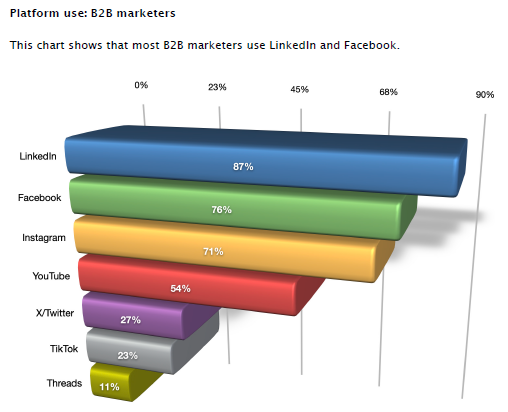
- This chart shows the distribution of B2B marketers using social media.
-

- The survey reported more leads come from LinkedIn.
- 60% of marketers reported they will increase their organic activities on YouTube.
- 61% of marketers reported they will increase their organic activities on LinkedIn.
76% of B2B marketers. - 14% will decrease their organic activities on X/Twitter. Only 17% plan to increase.
- 30% will increase their organic activities on TikTok. On the other hand, 51% have no plans to use TikTok.
Moral of the Story
Social media platforms change almost daily. You need to read articles, listen to podcasts, watch videos from the experts to stay on top of what is happening. You also need to measure your social media efforts on a regular basis to see what is working, what is not working.
To have any success, you must be consistent with your posts and your engagement. (Engagement is responding to comments on your posts, commenting on others’ posts and reaching out to new followers.)
Your Computer Lady can help you develop a marketing plan. We can help you make posts. We can help you measure your results. We’re a tool to implement your plan! Call to discuss your specific needs today.
Recommended Resources
Gary Vaynerchuk(WARNING! Extreme language.)
Social Media Metrics
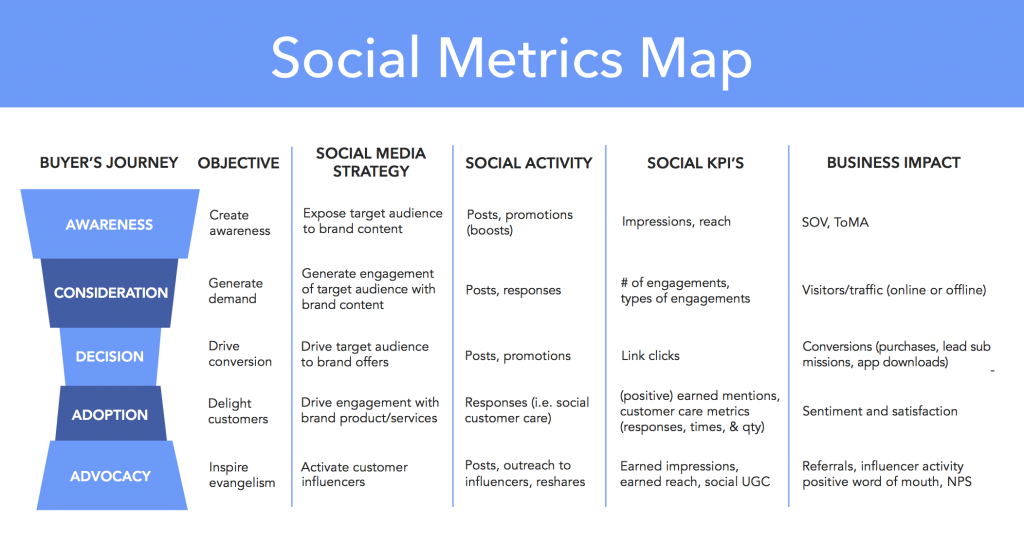 Look at this excellent diagram – Social Metrics Map. It details your goal, your social media action AND your measurement!
 Contest Marketing
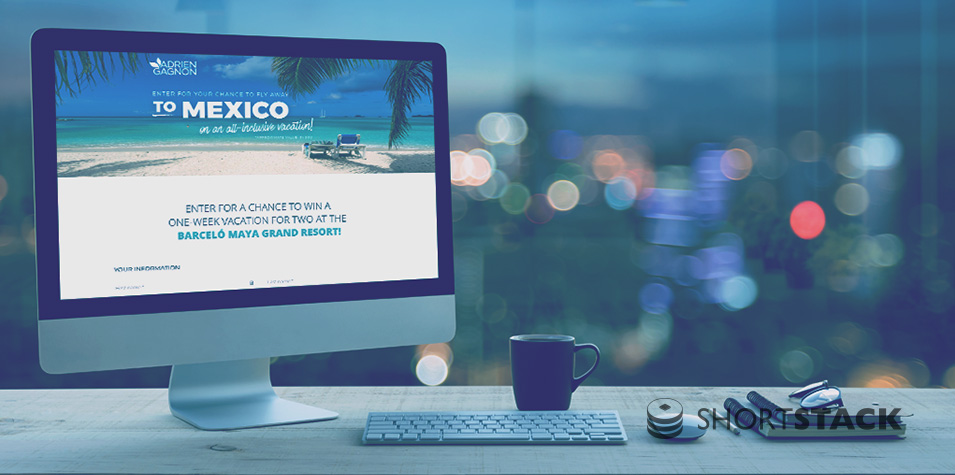
Could a contest bring you new clients or new sales? It depends. Read this article to see some examples of successful contests. Consider your business, your goals, your budget. Then let’s talk about a contest for you! Click here to read more about Contests.
Your Guide to Bulletproof Email Buttons that Work
 “Have you heard of the email design-shop analogy? If your webpage is your store, and your email is your shop window, then your call-to-action (CTA) button is your amazing window display that draws people in. Needless to say, your CTA is one of the most important parts of your email, and if it’s hard to find, hard to use, or broken in any way, your subscribers aren’t going to click! “
Don’t Get Scammed!
I had another client get scammed last week by the “Microsoft noticed that your computer has a virus and we want to help” message that commandeers your computer.
MICROSOFT NEVER EVER CONTACTS YOU ABOUT A VIRUS OR PROBLEM
WITH YOUR COMPUTER! NEVER.
Do not call the number given in the message! Do not let unknown persons remotely access your computer. Do not give unknown persons your credit card info.
If you are ever in doubt, call me or text me at 480-433-9995 for help.
Or take these steps to get out of the lock.
Try to close your browser completely.
If that doesn’t work, hit Ctrl+Alt+Del to open your Task Manager and force the browser to close.
If that doesn’t work, power off the computer. Hold the power button down several seconds until it forces a shut down.
Unplug your modem. Then restart the computer. If the message shows up again, try to close it again. There is no Internet connection so it can’t do any harm at this point.
Shut down the computer again. Re-plug the modem. Turn on the computer. Open your browser.
If you see the message again, call one of my hardware referrals. Let them clean up the problem.
If you don’t see the message, say a gratitude prayer!
Building Bridges Business Solutions
602-604-5000
Les Ticey
Expert IT Support
480-217-3721
James Casteneda
Email Marketing Waste

Here is a great example of how to waste your email time and money. The From is “service.” Who the heck is that? Looks like spam so I’m not opening it. The Subject line is “dry cleaning coupon.” I don’t need a coupon today and it’s Monday morning. Delete!! The opening line (which I can see in my preview) is “Dear Valued Customer.” Yeah. I’m so valued that I’m anonymous. And let’s go one more. I have never done business with this dry cleaner; I have no clue how they got my email address so I am not happy about that. They probably bought an email list somewhere. But I have no interest in their product so the email is a total waste. They’ve only irritated me. If I should need a dry cleaner soon, do you think I’ll go to them?
- « Previous Page
- 1
- …
- 15
- 16
- 17
- 18
- 19
- …
- 32
- Next Page »