 More and more of my clients are getting leads from their Google Business listing. The reviews are powerful in building credibility and trust. This article walks you step-by-step through how to build a great profile. You can always call YCL for help!
Monotonous Monday
Sales Emails
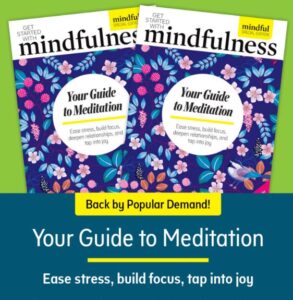 I think this is a very excellent example of a sales email. It is promoting book sales. It could just as easily be used for a webinar, a class or an event.
- You see an image of the front of the book
- You see the costs
- You see a short description written with bullet points
Then there are images and descriptions to address specific pain points. After each section, there is a Buy Now button. The images “say” more than the descriptions.
In closing, there is another image of the book cover and a description. The costs are repeated.
So this is a fast skim to see if the information applies to me. The email keeps my attention by addressing specific pain points and different levels of need. They start with How to Meditate and move to How to Deepen Your Practice.
This email has a much greater chance of grabbing my interest than a message that has 1 description and 1 price. Especially if that description is long and wordy!
Customer Reviews
 Customer reviews are becoming more important on social media platforms. It isn’t just Yelp for restaurants! I started my research for a new dentist at Yelp last weekend. More and more of my retail clients are telling me about business coming in after reading reviews on Facebook, Google or many of the other sites. You need to respond to good reviews and to bad ones. Don’t be afraid of bad reviews. If you have 20 5 star reviews and 1 griping curmudgeon, people are going to downplay the complainer. We all know people like that. But note in this article how few people respond to good reviews and how responding increases sales!! If you need help putting together your action plan, call Your Computer Lady.
Only One Gmail Inbox
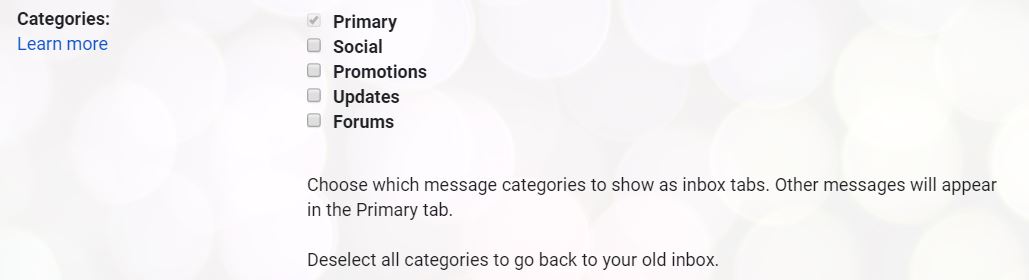
Having an Inbox, Social and a Promotions tab is too much!! Sorting is supposed to help but it just mucks things up for me.
So turn the extras off.
In Gmail,
- Go to Settings
- Settings
- The Inbox tab
- In the Categories section,
- Un-check Social, Promotions, Updates, Forums
- At the bottom of the page, click the Save Changes button
Go back to your Inbox. There’s only 1!!!!
- « Previous Page
- 1
- …
- 16
- 17
- 18
- 19
- 20
- …
- 75
- Next Page »