
• Home
  • Business Solutions
    • What Does Your Computer Lady Do?
    • Marketing Consulting
    • Your Computer Lady On Call
    • Digital Organizer
    • Email Marketing
      • Turnkey Email Marketing Service
    • Web Site Design
    • Web Site Maintenance
    • WordPress Maintenance
    • Copywriting
    • Video Services
    • Social Media Support
  • Portfolio
  • Blog
  • About Us
    • AI Policy
  • Contact Us
    • Book Us
    • Online Payments
    • Strategic Partners

Your Computer Lady

  • Email
  • Facebook
  • Instagram
  • LinkedIn
  • YouTube
You are here: Home / Archives for yclmanager5

October 11, 2024 By yclmanager5

Copyright Images

Yes, there are 100s of 1000s of images all over the Internet.  But just because you can see an image doesn’t mean you can use the image in your website, emails, social media or printed materials.

How to Check the Copyright Status of an Image

  1. Look at and around the image. Often the photographer’s name or copyright will be in a caption below the image. If you see the notification, you need to contact the photographer or owner for permission to use the image.
  2. Look for a watermark in the image. The photographer/owner will put the notification right in the image. DO NOT under any circumstances, remove or hide the watermark and use the image.
  3. Look for metadata. Right click on the image in Windows and look at the Properties info. On a MAC, open the image in preview then look at Tools. The ownership should be deliniated there. Contact the owner before using the image.
  4. Do a Google reverse search.
    1. Open Google images.
    2. Drag the image into the search bar.
    3. Google will offer you the ownership information or a choice of Exact matches. Click the exact matches to look further for ownership.

If in doubt, don’t use the image!

There are bots that are used by companies and law firms to find their images used illegally. When they find an image, you will get a letter telling you how much you owe them for the use of the image. It can be anywhere from $20 to thousands. It’s pretty hard to fight that kind of legal action when you have the means to look for owner information.  (NOTE!! There are some bad players in the world like Higbee & Associates who pretend to work on copyright issues. Beware!)

Creative Commons license

This is an image that is in the public domain and can be used by anyone.

Where To Look For Free Images

Google Images

  1. Search for the image you want (EX: puppies)
  2. On the 2nd navigation menu, look for Usage rights.
  3. Click the drop-down menu.
  4. Select Creative Commons licenses.
    This selection is not 100% dependable to keep your eyes open as you look at
    specific images.

Unsplash.com

Getty Search Gateway

Pexels free and paid

Pixabay free and paid

Free Public Domain

Pinterest  maybe, maybe not

Flickr  maybe, maybe not

Adobe, iStock, Shutterstock, Getty will occasionally have a free image but not often. Be careful if you use anything from them.

If you are a rep or distributor or reseller for a manufacturer, your contact with them most likely gives you permission to use their images. They want you to use their images as often as possible!  But, if in doubt, ask them!
 

Share the post "Copyright Images"

  • Facebook
  • Bluesky

Filed Under: Technology

June 1, 2023 By yclmanager5

Administrator for an International Conference

YCL command centralThe Int’l Federation of Health Information Management Associations (IFHIMA) asked YCL to act as the administrator, program manager, and tech support for their conference in November. It was a different type of project for YCL which turned out to be a great experience!

This was IFHIMA’s first online conference for their official delegates across the world. Previously all conferences had been done with in-person meetings which is difficult for an international group, especially in the midst of the COVID-19 pandemic. They wanted to try the online meeting to meet their constitutional requirements for governance and develop options for online or hybrid meetings in the future.

Your Computer Lady was responsible for:

  • Maintaining a Planning Calendar for the months leading up to the conference to keep the Board, Regional Directors and special participants on a fairly tight schedule to prepare presentations for the conference.
  • Providing tech support on Zoom for 3 board meetings including a practice session.
  • Communicating with presenters around the world on their written presentations as well as their oral presentations during the conference. The presenters included people with excellent computer skills and people with few computers skills. It included people who spoke English as their native language and people who spoke English as a second language.
  • Preparing a 108 page online publication for the attendees with all of the reports, graphs, PowerPoints and information.
  • Promoting the conference with email marketing.
  • Preparing the PowerPoint to act as the guide during the conference.
    o Included different types of information: text, graphs, graphics, video.
    o Included 10+ presenters.
    o Was timed to meet the 90 minute time frame. Phew, what a task this was since the meeting circled the globe and presenters have such varied skills!

IFHIMA logo

Share the post "Administrator for an International Conference"

  • Facebook
  • Bluesky

Filed Under: Portfolio

May 19, 2023 By yclmanager5

Portfolio-Cornerstone Cabinet Company

Share the post "Portfolio-Cornerstone Cabinet Company"

  • Facebook
  • Bluesky

Filed Under: Portfolio, Portfolio - Videos

May 16, 2023 By yclmanager5

Administrator for an International Conference

The Int’l Federation of Health Information Management Associations (IFHIMA) asked YCL to act as the administrator, program manager, and tech support for their conference in November. It was a different type of project for YCL which turned out to be a great experience!
This was IFHIMA’s first online conference for their official delegates across the world. Previously all conferences had been done with in-person meetings which is difficult for an international group, especially in the midst of the COVID-19 pandemic. They wanted to try the online meeting to meet their constitutional requirements for governance and develop options for online or hybrid meetings in the future.

YCL was responsible for:

  • Maintaining a Planning Calendar for the months leading up to the conference to keep the Board, Regional Directors and special participants on a fairly tight schedule to prepare presentations for the conference.
  • Providing tech support on Zoom for 3 board meetings including a practice session.
  • Communicating with presenters around the world on their written presentations as well as their oral presentations during the conference. The presenters included people with excellent computer skills and people with few computer skills. It included people who spoke English as their native language and people who spoke English as a second language.
  • Preparing a 108 page online publication for the attendees with all of the reports, graphs, PowerPoints and information.
  • Promoting the conference with email marketing.
  • Preparing the PowerPoint to act as the guide during the conference.
    • Included different types of information: text, graphs, graphics, video.
    • Included 10+ presenters.
    • Was timed to meet the 90 minute time frame. Phew, what a task this was since the meeting circled the globe and presenters have such varied skills!

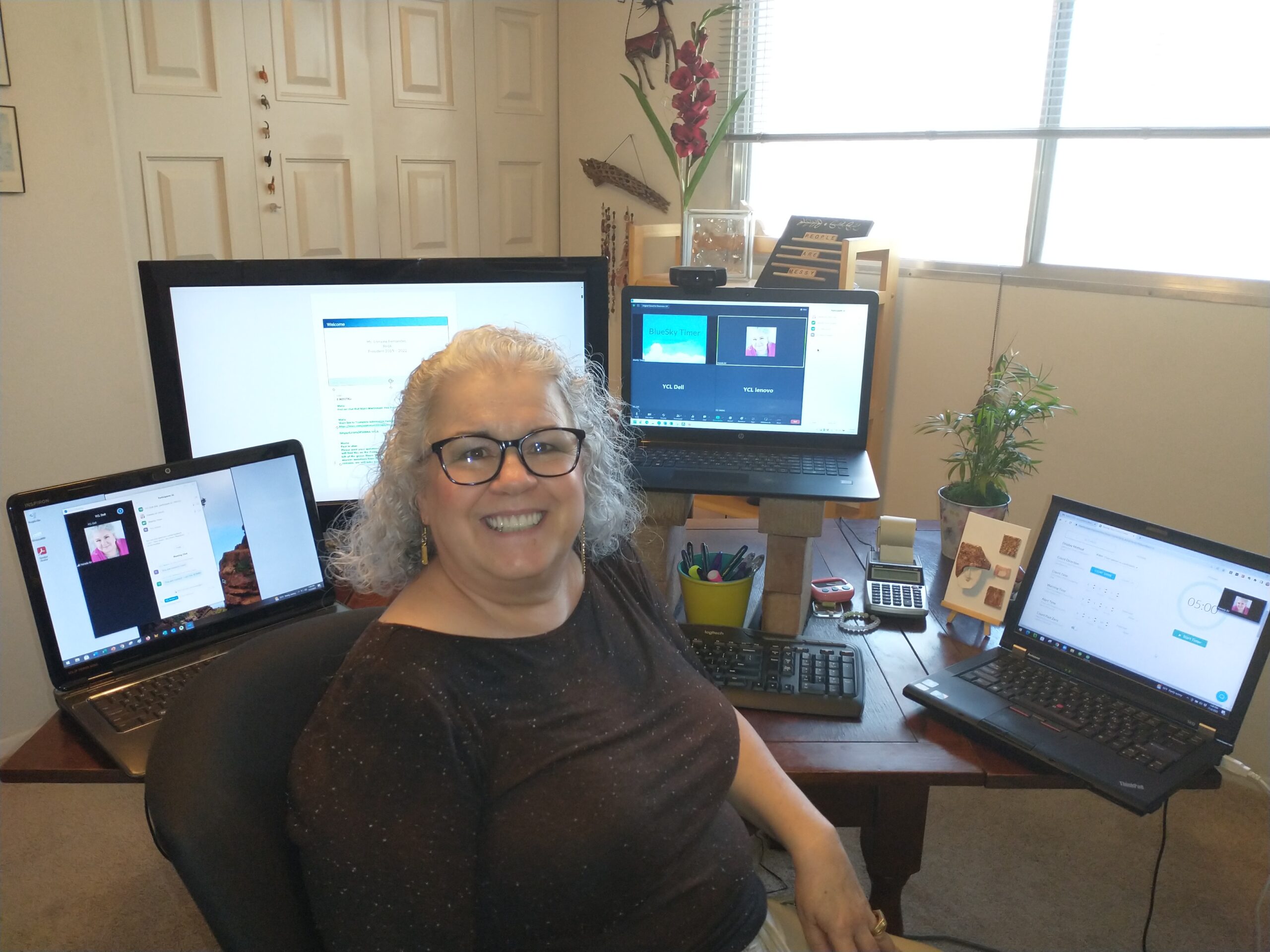
The day of the conference (which began at 4 am AZ time!), YCL was tech support.

  • We used 3 computers!
  • We coordinated the PowerPoint with the speakers. Some of whom had weak and inconsistent Internet connections. The President leading the conference was hit by a major snow storm the day before the conference and had very limited power the day of the conference.
  • We ran the Zoom meeting.
  • We ran the timer for the presenters.
  • We did 4 different polls.

Conference Wrap Up

  • YCL provided final documents to the board.
  • YCL did a debriefing to look for improvements for the next conference.

All in all, it was a fascinating experience. It was our first international job.  It was a project with many moving parts and pieces. It was a project using new technologies.

Great fun!  The best part of Your Computer Lady for me is meeting new people and learning about new industries. This job included all of that in spades!

Share the post "Administrator for an International Conference"

  • Facebook
  • Bluesky

Filed Under: Portfolio

May 2, 2023 By yclmanager5

Portfolio- Amazing Staging

Your Computer Lady can take your still photos and turn them into a beautiful video with graphics, music and text to help you show your expertise.

This video demonstrates the skills of Amazing Staging.

Share the post "Portfolio- Amazing Staging"

  • Facebook
  • Bluesky

Filed Under: Portfolio - Videos, Videos

April 30, 2023 By yclmanager5

Portfolio-Cornerstone Cabinet Company

Take a peek at one of Cornerstone’s latest triumphs – a luxury contemporary renovation.

Share the post "Portfolio-Cornerstone Cabinet Company"

  • Facebook
  • Bluesky

Filed Under: Portfolio, Portfolio - Videos

April 29, 2023 By yclmanager5

Portfolio- JEM Video

We used sources from clients and pulled information and facts to create the video to share these facts in a visually appealing way. This video is about Suicide Prevention.


Share the post "Portfolio- JEM Video"

  • Facebook
  • Bluesky

Filed Under: Portfolio, Portfolio - Videos

April 20, 2023 By yclmanager5

Portfolio-Amazing Staging

Your Computer Lady can take your still photos and turn them into a beautiful video with graphics, music and text to help you show your expertise.

This video demonstrates the skills of Amazing Staging.


Share the post "Portfolio-Amazing Staging"

  • Facebook
  • Bluesky

Filed Under: Portfolio - Videos, Videos

April 18, 2023 By yclmanager5

Portfolio- Cornerstone Cabinets

We created this video to share our clients raving reviews.

Share the post "Portfolio- Cornerstone Cabinets"

  • Facebook
  • Bluesky

Filed Under: Portfolio - Videos

April 16, 2023 By yclmanager5

Portfolio- JEM Video

We used sources from clients and pulled information and facts to create the video to share these facts in a visually appealing way. This video is about removing the stigma associated with mental health.


We made two versions of this video one was shorten for social media. 


Share the post "Portfolio- JEM Video"

  • Facebook
  • Bluesky

Filed Under: Portfolio, Portfolio - Videos

  • « Previous Page
  • 1
  • …
  • 22
  • 23
  • 24
  • 25
  • 26
  • …
  • 32
  • Next Page »

Services

  • What Does Your Computer Lady Do?
  • Marketing Consulting
  • Web Site Design
  • Web Site Maintenance
  • WordPress Maintenance
  • Email Marketing
  • Video Services
  • Search Engine Optimization
  • Social Media Support

Sign up...

 ...for our eNews and SMS messages.
You will receive .5 hour of free consulting on your first project!

Testimonials

  • Testimonials

Blog Topics

  • Apps
  • Artificial Intelligence
  • Blogging
  • Comic Relief
  • Email Marketing
  • Internet
  • Marketing
  • Microsoft Office
  • Microsoft Office – Outlook
  • Microsoft Office – Publisher
  • Organization & Productivity
  • Portfolio
  • Portfolio – Computer Skills Training
  • Portfolio – Email Marketing
  • Portfolio – Marketing
  • Portfolio – Social Media
  • Portfolio – Videos
  • Portfolio – Web Sites
  • Search Engine Optimization
  • Social Media
  • Social Media – Facebook
  • Social Media – Instagram
  • Social Media – LinkedIn
  • Social Media – Pinterest
  • Social Media – YouTube
  • Something to Think About
  • Technology
  • Testimonials
  • Uncategorized
  • Videos
  • Websites
  • WordPress

Copyright 2010-2025 · Your Computer Lady Inc. All rights reserved.   Privacy Statement.   Website Disclaimer.